Get Started
Company
Copyright © 2022. Logaholic Web Analytics BV

Selecting the Log File Analysis (Local Server File) option from the Data Collection tab opens a form where you can enter information about the location and nature of your local website log file. This Data Collection method uses your local website log file on your server as the source data for your web analytics.
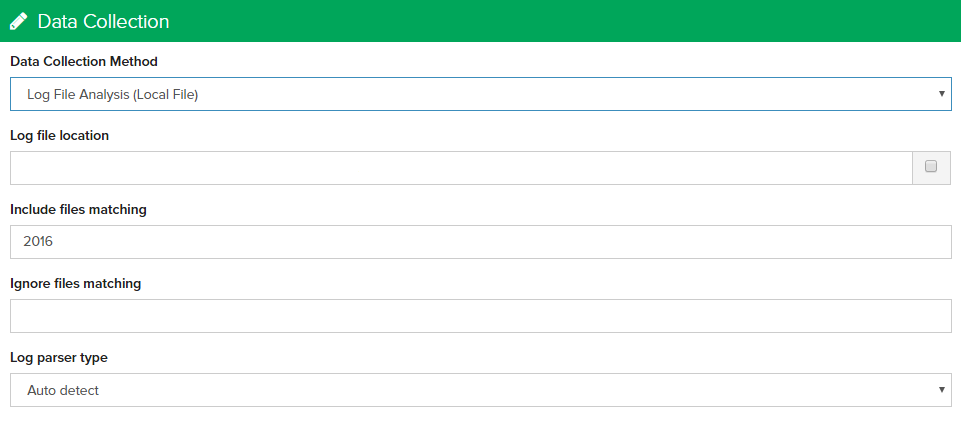
Enter the complete absolute pathname for your domain’s web server log file, in common/combined format (Apache standard). e.g. /home/mydomain/logfiles/access_log.
This file may be plain-text or compressed (.gz extension).
Below the word “Hint:” you’ll see the complete absolute path to the logaholic directory on your system. The log file is usually located in a directory a few levels above the root folder of your website (commonly ‘www’ or ‘htdocs’).
If you cannot find your log file, or if you know where it is but Logaholic cannot access or read the file, use your “ftp client” or the “Log file location field” to browse through the folders of your website / hosting account.
Look for folders or files with names or extensions like log, stats, or statistics.
The local log file may be named something like “www.yourdomain.com.log” on shared servers, or simply “access_log.”
As of version 2.7.7+, Logaholic supports collecting and analyzing data from multiple log files. Use this option if your log files are recorded and archived into individual files by period. Logaholic will then import all of these files from your log file directory.
To scan the entire directory for multiple files, be sure to end the address in the “Log file location” field with a forward slash (/).
Check “Recursively search directories” to include subdirectories when scanning for log files.
Enter a Filter (Optional) and indicate whether you want to only analyze files that match:_____________ but not__________.
The Filter can be used to avoid unwanted files in the directory to be analyzed. For example, if all your log file name start with “access_log,” enter that text into the filter field. Only files that match the first field will be analyzed, except if the file also matches the second field (“but not”). Leave both fields blank if all files are to be analyzed.
If you require more complex filtering, you can also use wildcards * and regular expresssions to reference your log file names, e.g. (^www\.[xyz|abc.xyz].log.*)
Click “Save” to save the changes you’ve made to your Javascript Based Tracking configuration.
Click the “Save Changes” button at the top of the page to save your changes, or click the “Cancel” button to undo your changes.
