Get Started
Company
Copyright © 2022. Logaholic Web Analytics BV

On the Edit Profile page, click Data Collection, where you will find the Java Tracker code you’ll need to paste into each page of your website that you wish to track. This code is executed each time a page is displayed, keeping track of your visitors and transferring the tracking data for use within Logaholic.
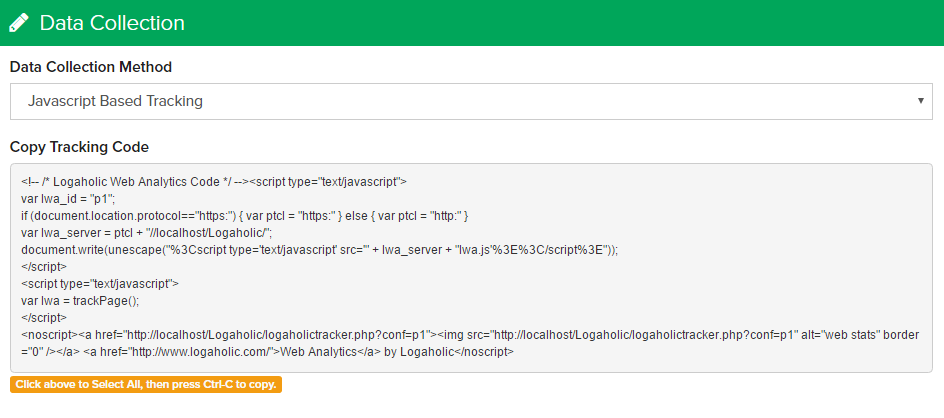
Click inside the “Copy Tracking Code” block shown in Figure 0 to select all of the text inside. Then click “Ctrl-C” to copy the entire contents of the block. You’ll paste this code into your website pages in the next step.
Access your website through an FTP client
Many FTP clients are available (for free) on the Internet. The following are among the more popular: FileZilla, CoreFTP, and SmartFTP.
Connect to the FTP server of your website by using the FTP login information provided by your hosting service.
Once you’re connected, navigate to the folder where your html files are located.
Insert the Java tracker code
To analyze your entire website, you can place the Java tracker code within a component that appears on every page of the website such as a header or footer file. To track selective pages, place the code within each page (file) you wish to track.
Copy the html file to your computer and open it with a text editor such as wordpad or notepad.
Locate the <body> tag in the html file.
Insert (paste) the code you copied above directly (no spaces) after the <body> label.
Save your html file with the inserted code.
Copy the file back to your FTP server.
Static (HTML) Website Setup Complete
If your website is hosted within a content management system such as Joomla, WordPress, Drupal, Mambo, etc., follow the instructions below:
Log in using the administrator account of your website, for example: www.mywebsite.com/administrator
Once you’re logged in, navigate to the location within your content management system where you can edit your html template. In some cases this will be within the template manager of your content management system, but it may also be found in its own unique location.
Locate the <body> tag in the file.
Insert (paste) the code you copied directly after the <body> label.
Example code:
Dynamic Website Setup complete
Logaholic Live refreshes the tracking data from your site every 10 minutes. It may take 10 – 15 minutes before you can first view your website’s statistics in your Logaholic Live account.
If you have any questions or need further information, please contact us
Click the “Save Changes” button at the top of the page to save your changes, or click the “Cancel” button to undo your changes.
