Get Started
Company
Copyright © 2022. Logaholic Web Analytics BV

Global Settings for Logaholic are typically entered during Installation. However you can also update this information after set up by clicking on the Global Settings tab in the top menu.
License information
The Global Settings tab provides you with information about your Logaholic license including the version of Logaholic you are running, the number of users you have established, as well as the Logaholic product for which you are licensed (Self Hosted Edition, Service Provider Edition, or Logaholic Live).

Change Profile Settings
Opens the “Edit Profile” tab where you can modify the settings for your Logaholic Profile.
User Administration
This option applies only to Logaholic (SPE) Service Provider Edition. Opens the User Administration form where you can restrict access to certain profiles or provide users with access to their own statistics, while blocking others.
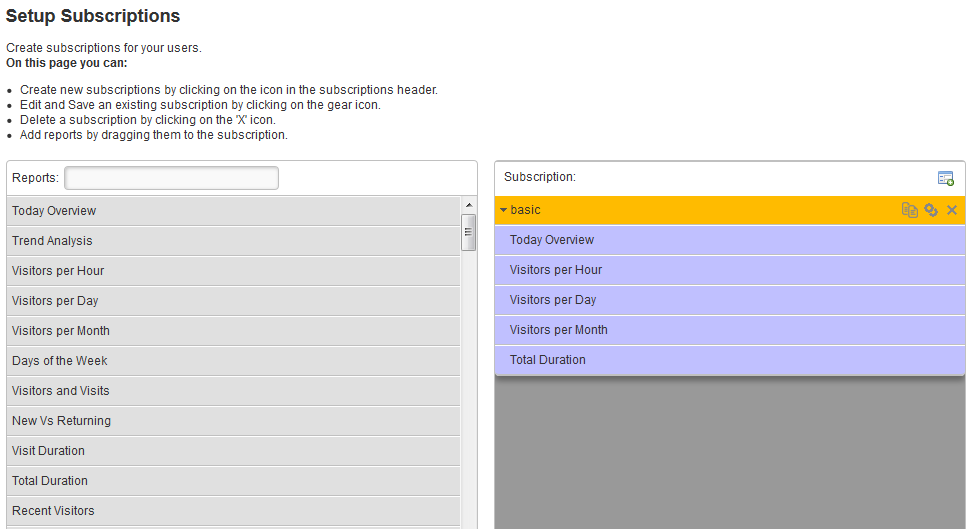
Setup Subscriptions
With setup subscriptions you can manage reports for your user profiles.
Install Reports
Logaholic offers an extensive collection of reports. If you need any additional reports -next to the reports that are already included in your Logaholic Edition- you can visit our Report store. You can also access the Report Store from the software itself, by clicking the faded reports in your “Reports” menu.

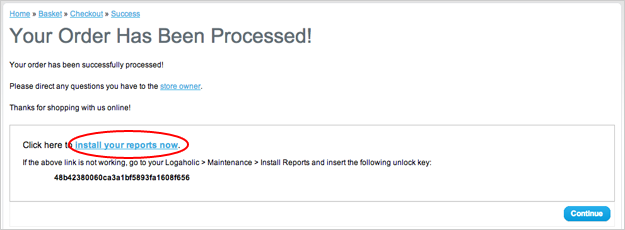
Once you decided to buy one (or more) report(s), go through the checkout process. After completion of the order, your unlock key will be shown. “Install your reports now” takes you back to the software to complete the installation.
If you reached the Report Store without being logged in to your Logaholic installation, the option “install your reports now” is not available. In this case just the copy the unlock key and start up Logaholic.
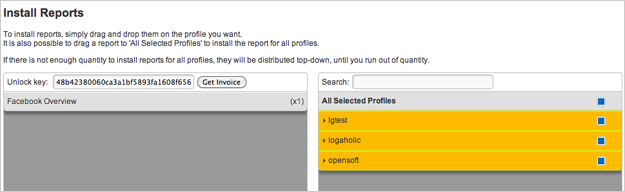
When you return to your settings, completing the installation is easy. Simply drag and drop the purchased report(s) on the profile you want. It is also possible to drag a report to “All Selected Profiles” to install the report for all profiles. (see screenshot below)
Check for updates
Opens the Logaholic.com website in a new browser tab in order to check for updates and newer versions of the Logaholic software.
Change Database Settings
Opens the Settings form where you can modify the settings for your Logaholic database including the database name, its location, the database user id, and the database password. Database Settings for Logaholic can be entered during the Set Up Wizard. However you can also enter or revise this information after set up.
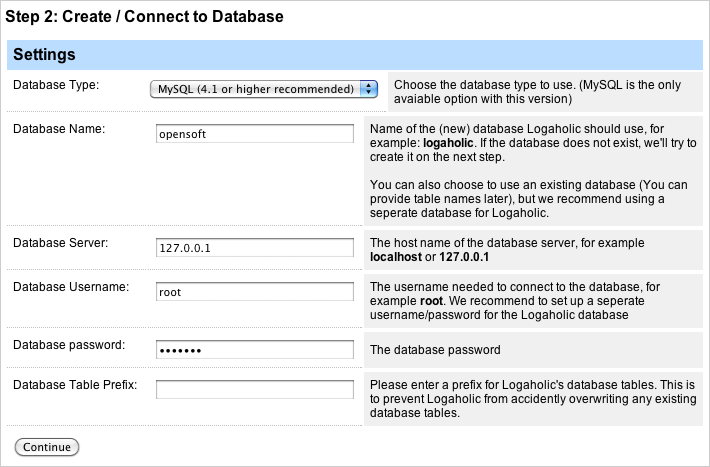
For Database type: Select MySQL
For Database name: You can supply a new name (recommended), such as Logaholic, or use an existing name.
For Database server: Supply the name of the server on which MySql is running. If Logaholic is installed on the same server as your MySql database, use “localhost” or “127.0.0.0”. If you have specifically named your database differently or the MySql database is installed on a different server, supply the correct name of the database server.
If MySql is located on a hosted website (virtual server), please ask your ISP to provide you with the the name of the MySql server.
For Database Password: supply your MySql password. Please note that the supported version of MySql requires that you secure your database with a password. Though older versions may work without a password, we strongly advise that you password protect your database.
Delete a date range from the entire database (all profiles)
Allows you to control the growth of your Logaholic database by deleting the data for all of your Logaholic Profiles from the Logaholic database for a selected date range.
Enable IP Encoding
Allows you to enable or disable IP encoding. This setting determines whether or not Logaholic stores or displays the actual IP addresses of the visitors to your website. Enabling this setting encodes these addresses. This makes Logaholic more compliant with German privacy laws. Disabling this setting displays and stores the actual IP addresses of the visitors to your website.
Change Affiliate ID
Here you can simple enter or change your affiliate ID.
Change Custom Date Format
With this setting you can adjust the default date format for all the reports in every profile.
You can also set the date fomat individual for each profile in their profile settings bij going to “edit profile”.
Datamanager Settings
Max datarange determines for what maximum period of time Logaholic stores data for you. Like all Global settings, these apply to ALL your profiles. You can also set the date fomat individual for each profile in their profile settings bij going to “edit profile”. If it is set to “No Limit”, all of your historical data will remain preserved. If set to “1 Month” for example, all data that is older than one month will be deleted.
Data directory is simple the directory on your server (or local machine) that Logaholic uses for data storage. Always make sure that the “file permissions” are set to “777″ for this folder.
Maximum Log File storage size.
The default Log File storage size is set to 5000MB. This is a very large number, since the stored log files will only take up a few MB’s per month. The storage size can be adjusted to your preferences and server capabilities.
Change Upload Directory
Allows you to change the location of the uploaded log files that Logaholic uses as source data for your website analytics. For security reasons, we highly recommend that you change the upload directory to a path that is outside your web root (i.e., a directory that can not be accessed via the web, but can be accessed by PHP. To do this, you will also need to modify the open_basedir setting in your PHP.ini file. See the Additional Notes below.
Uninstall Logaholic
Allows you to completely remove the Logaholic database and all accumulated analytics data. Please note that this process drops the database named ‘logaholic’ and will remove all data. DO NOT do this if Logaholic is installed on a shared database, i.e., a database that also contains other information besides the Logaholic data.
1. Protect your Logaholic directory with a password!
If you want to prevent others from accessing the logaholic reports, you need to password protect the logaholic directory. The way to do this is to go to your “Global Settings” and go to “User Administration”. change your Authentication Method to “User Logaholic login dialog” and submit. The default username is “admin” with the password “logaholic”.
2. Delete the install.php file
You will no longer need this file so you can safely delete it. If you do not password protect your logaholic directory, make sure you delete this file.
3. Change Permissions of the files/global.php file
This file contains your database server information, including the database username and password. You can change this information by clicking “Change Database Settings”. However, it is best to change the permissions of the file to disallow writing if Logaholic is working properly. If you do not password protect your logaholic directory, make sure protect this file.
4. Watch the Video Tutorials
If you are new to website statistics, wondering what all information means and how it can benefit your situation; we suggest you watch our video tutorials (videos are added regularly).
5. Prevent Crawlers from indexing your statistics reports
If you do not password protect your Logaholic directory, we recommend that you make the following additions to your robots.txt file:
User-agent: Googlebot
Disallow: /logaholic
User-agent: *
Disallow: /logaholic
The PHP open_basedir setting specifies which directory paths PHP may access. If you want Logaholic to read local access logs on this system, make sure the path to your log files is included in the open_basedir setting in your PHP.ini file or the Virtual host definition in your apache httpd.conf file.
To do this, add :/path-to-you-log-files to the end of the list. For example if the setting (in your php.ini file) currently looks like this:
open_basedir = “/current-setting:/tmp”
Replace it with this
open_basedir = “/current-setting:/tmp:/path-to-you-log-files”
Replace “path-to-your-log-files” with the actual system path of the folder containing your log files.
When Logaholic is hosted on a Windows Workstation, the PHP.ini settings can be located by running WAMPSERVER then selecting “PHP > php.ini” from the PHP and Apache menus.